
Remitly: Send Money & Transfer
RemitlyFinance
4.864.41K Reviews
- Version
- 7.4
- Installs
- 10.00M
- Age Rating
- Everyone
Screenshots

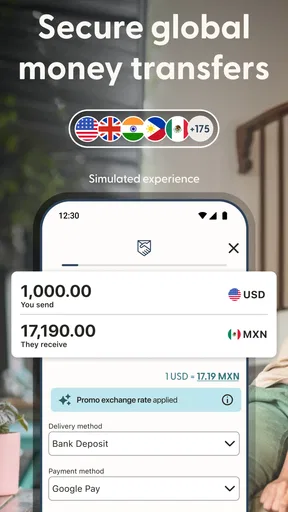

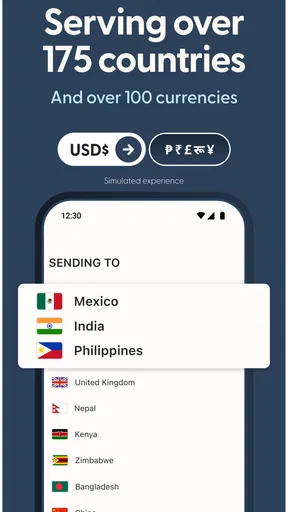
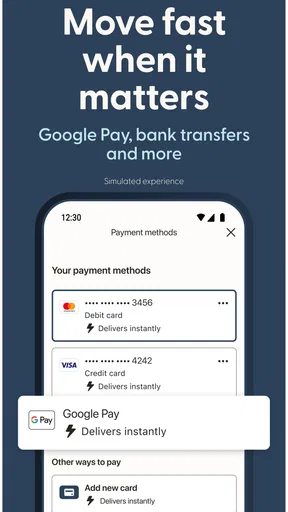
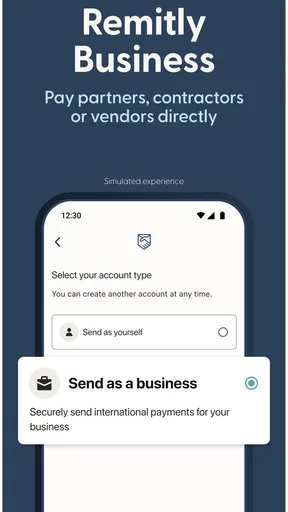
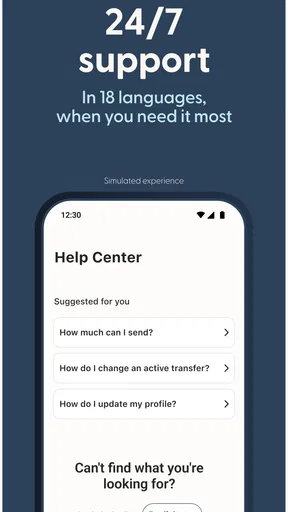
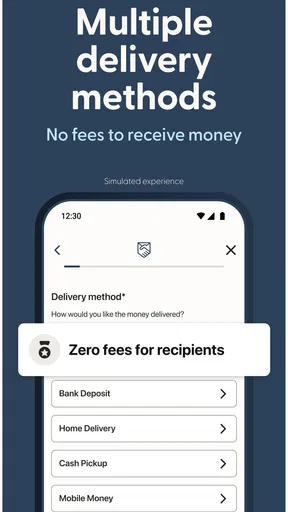
Our Review of Remitly: Send Money & Transfer
 Analysis by Appyee
Sending money across borders is one of those tasks where convenience matters, but trust matters more. I looked at Remitly: Send Money & Transfer as a finance app rather than treating it like a simple shopping tool, because an international transfer involves identity, payment details, recipient information, and a decision that can be difficult to undo. My overall impression is that it is designed for people who want a guided way to send money abroad, with the developer clearly identified as Remitly and a free download for Everyone.
The app has been around since Jul 25, 2013, and its current version is 6.76. It supports international transfers across more than 100 currencies, which gives it a practical role for family support, relocation expenses, education payments, and occasional help to someone living in another country. It is available for devices running OS 10 or later. The important point is that the app is not trying to replace every part of your banking life; its purpose is narrower and more useful when you need to move money between countries.
How Remitly feels when trust is the main concern
My first recommendation is to treat the app as a transfer workspace, not as a place to rush through a payment. The cleanest experience comes when you already know the recipient’s legal details, destination, and the amount you intend to send. That preparation reduces the chance of stopping halfway through a transaction because a name or account detail does not match.
Remitly has attracted a large user base, with over 10 million installs and an average rating of 4.8 from around 1.6 million ratings. Those figures suggest that the app is familiar to many people, but they should not replace your own check of the transfer details. A popular finance app can still be the wrong choice for a particular destination, payment method, or urgency requirement.
I also like that the app’s purpose is easy to understand. The name, category, and store positioning make it clear that this is an international money-transfer service from Remitly, not a general-purpose wallet or a budgeting app. That focus helps avoid one common mistake: assuming that an app built for sending money abroad will offer the same controls, protections, or timing as your regular bank account.
What I would prepare before opening a transfer
Before starting, I would have the recipient’s information in front of me and decide whether the transfer is for a routine family payment or something time-sensitive. I would also check the destination currency and review the final amount carefully before confirming. This sounds basic, but international transfers are exactly where a small typo or an overlooked conversion can create unnecessary stress.
A useful habit is to separate the “how much the recipient should receive” question from the “how much I can afford to send” question. I first decide the intended amount for the person abroad, then review what the app shows on my side. That makes it easier to notice when the total cost or exchange result does not fit my plan. I would not rely on memory from a previous transfer, because currency values and available routes can change.
For a recurring family payment, I would keep a simple private record of the date, recipient, purpose, and amount. This is not a feature claim about the app; it is a practical way to make the account easier to monitor. It also helps when several transfers look similar and I need to distinguish a regular monthly payment from an unusual request.
Account controls deserve more attention than speed
When I use a finance app, I pay attention to every screen that asks me to confirm identity, recipient information, or payment details. Those steps can feel like friction, especially when I am trying to send money quickly, but they are also the moments when I have the clearest opportunity to catch a mistake. I would rather spend an extra minute reviewing a transfer than discover later that I entered the wrong destination.
The most important user control is the ability to stop and review before completing the transaction. I would read the recipient name, destination, currency, and total shown on the final review screen instead of tapping through automatically. If the app presents a delivery estimate or transfer status, I would treat it as information to monitor rather than a reason to skip the confirmation details.
For account safety, I would use a strong, unique password and avoid signing in on a shared device. I would also keep the phone’s operating system updated, especially because the app requires OS 10 or later. These are sensible precautions for any financial service, but they matter more here because the account may contain information about both the sender and another person.
One practical workflow is to install the app, sign in, and explore the transfer screens before you actually need to send money. That lets you learn where the recipient details and review steps appear while there is no pressure. If a family emergency occurs later, you are less likely to make a rushed decision simply because the interface is unfamiliar.
Data-sensitive moments during a transfer
The most sensitive part of using Remitly is not browsing the app; it is entering information connected to a real person and a real payment. I would be especially careful when typing the recipient’s name, contact details, and destination information. I would also avoid copying details from an unverified message without checking them through a separate, trusted conversation.
This matters in everyday situations. Imagine that a relative has moved abroad and asks for help with rent. I would call or message them through the usual channel first, confirm the exact recipient details, and only then begin the transfer. If the request arrived unexpectedly or included pressure to act immediately, I would pause. The app can make sending convenient, but it cannot independently decide whether the person requesting money is genuine.
I would also pay attention to what the app displays before confirmation. The transfer amount, currency, recipient, and any timing information should be checked as a group rather than individually. A familiar name is not enough if the destination is wrong, and a correct destination is not enough if the amount is different from what I intended.
Another overlooked moment is the phone itself. I would not start a transfer while connected to an unknown public network or while someone else is watching the screen. I would avoid taking screenshots of sensitive confirmation pages unless I had a clear reason, and I would store any record securely. Convenience should not turn a private financial action into information that is casually shared.
Where the app gives users practical agency
Remitly is most useful when I want a focused path from sender to recipient instead of navigating a traditional bank’s broader international-services menu. The app’s support for more than 100 currencies gives it a wide reach for people whose transfer needs do not fit a single corridor. That does not mean every route will feel identical, so I would still inspect the options shown for my specific destination before planning around them.
The free price is helpful for trying the service, but “free” refers to getting the app, not automatically to every transfer outcome. I would judge the transaction by the final amount, conversion result, and any displayed costs or conditions before confirming. This is one area where the app should be compared with a bank or another transfer provider using the actual route and amount, not a general assumption about which category is cheaper.
Compared with a regular bank transfer, a dedicated app can feel more direct and easier to follow. A bank may be preferable if you already manage the recipient and payment through an established account relationship, or if you need broader banking tools in the same place. Compared with handing cash to someone or using an informal arrangement, a digital transfer gives me a clearer process to review, but it also creates a stronger need to protect login and recipient information.
I would not choose Remitly simply because the recipient is in another country. I would choose it when the app’s route, currency, timing, and total result make sense for that particular payment. For a small, non-urgent family transfer, convenience may matter most. For a large payment, I would spend more time comparing the final result and checking every detail, because a small difference in conversion or cost becomes more meaningful as the amount grows.
Situations where I would slow down or choose something else
The app is not the right answer for someone who wants a full banking replacement. Its strength is sending money internationally, not managing every financial task. If your main goal is budgeting, saving, paying local bills, or tracking investments, you will need other tools. Using a transfer app for those purposes would create the wrong expectations.
I would also hesitate if I needed a guaranteed arrival time for a critical payment and had not checked the route in advance. International transfers can depend on the destination and the chosen method, so I would not promise a landlord, school, or service provider that money will arrive at an exact moment merely because I have started the process. For urgent obligations, I would compare the available options and leave room for delays.
Someone who dislikes identity checks or entering recipient information into a financial app may be more comfortable using an existing bank service, although banks also require careful handling of personal data. The right choice depends on which provider gives you the clearest controls and the most understandable confirmation process for your needs. I would not trade clarity for speed.
There is also a human limitation that no interface solves: the recipient details must be correct. If a relative changes banks, moves, or uses a different spelling of their legal name, I would update my own notes and verify the information again rather than assuming an earlier transfer proves everything is still current.
My approach to permissions, choices, and account privacy
When installing a finance app, I review the permission prompts instead of accepting them automatically. I grant only what is needed for the action I am taking and revisit those choices later if the phone allows it. I do not assume that a permission request is harmless simply because the app is popular, and I do not assume that refusing one will make the service unusable without first seeing what the app explains.
I would also read the privacy and account settings in plain language, looking for ways to manage notifications, sign-in details, and communication preferences. The useful question is not just “Can I use the app?” but “Can I control how the account reaches me and what I share while using it?” Clear choices are especially important when the app is connected to a payment account and a recipient’s information.
Notifications deserve a specific check. A transfer alert can be useful, but a lock-screen preview might reveal more than I want others to see. I would adjust notification visibility on the phone, particularly if I share a home, commute frequently, or use a work device. This is a small setting with a real effect on privacy.
If I stopped using the service, I would review the account area for available sign-out, support, or account-management options rather than simply deleting the icon. Removing an app from a phone is not the same thing as managing an online account. Keeping that distinction in mind is a good habit with any financial service.
What the strong reception tells me—and what it does not
The app’s reception is unusually strong, with around 62 thousand written reviews in addition to its large rating total. I see that as evidence that many people find the service usable, but I would still read recent comments with a specific question in mind: are users discussing the same destination, currency, and transfer method that I need?
International money movement is not one uniform experience. A smooth transfer for one corridor does not guarantee the same timing or available choices elsewhere. That is why I would use the app to inspect my own route before recommending it to a friend, rather than relying only on its overall rating.
The developer being listed as Remitly also makes the app easy to identify when comparing downloads. I would still check that I am installing the genuine app from the official store and avoid copies with similar names. In finance, identifying the correct developer is a basic but important part of the trust process.
My cautious verdict after using it
I would recommend Remitly: Send Money & Transfer to someone who regularly sends money abroad and wants a dedicated, guided experience instead of handling an international payment through a general banking interface. Its broad currency coverage, focused purpose, and strong user reception make it worth considering, especially for family support and routine cross-border payments.
My recommendation comes with a condition: I would never treat convenience as permission to skip verification. I would confirm the recipient independently, review the currency and final amount, protect the account, and compare the actual transfer result with a bank or another provider when the payment is large or time-sensitive. Those steps are more valuable than any general promise of speed.
For me, the best reason to use this app is control through a clear, deliberate workflow. The weakest reason would be downloading it in a hurry because someone is pressuring me to send money immediately. If you are comfortable checking details and managing your account carefully, this free finance app is a sensible option to test. If you need a complete bank replacement, guaranteed timing without checking the route, or a service that removes the need for personal verification, I would look elsewhere.
Privacy and Permissions
See what permissions an app requests and how it handles your data.
- Contacts
- read your contacts
- Phone
- read phone status and identity
- Photos/Media/Files
- read the contents of your USB storage, modify or delete the contents of your USB storage
- Storage
- read the contents of your USB storage, modify or delete the contents of your USB storage
- Camera
- take pictures and videos
- Microphone
- record audio
- Wi-Fi connection information
- view Wi-Fi connections
- Device ID & call information
- read phone status and identity
- Other
- view network connections, change network connectivity, control flashlight, full network access, change your audio settings, control Near Field Communication, run at startup, control vibration, prevent device from sleeping
Verdict
Strengths of Remitly: Send Money & Transfer
- Clear fee and exchange-rate details before confirming a transfer.
- Supports delivery to bank accounts, mobile wallets, and cash pickup.
- Transfer tracking and status notifications help monitor deliveries.
- Multiple payment methods are available, depending on the sending country.
- Recipient usually does not need a Remitly account to receive funds.
Limitations of Remitly: Send Money & Transfer
- Availability, fees, and limits vary considerably by country and corridor.
- Identity verification may delay the first transfer or larger transactions.
- Cash-pickup availability depends on local partners and their opening hours.
- Exchange rates can differ from those offered by banks or specialist services.
- Some payment methods and faster delivery options may cost extra.
Similar Picks in This Category
View All
Google Wallet
Google LLC4.3

Airtel: Recharge, Bank & Loans
Airtel4.0

PayPal - Pay, Send, Save
PayPal Mobile4.2

DANA Indonesia Digital Wallet
PT Espay Debit Indonesia Koe4.5

Binance: Buy Bitcoin & Crypto
Binance Inc.4.8

Cash App
Block, Inc.4.7
Frequently Asked Questions
What is Remitly: Send Money & Transfer, and how does it work?
Remitly is an international money transfer app that lets you send funds from supported countries to recipients abroad. After creating an account, you choose the destination country, enter the amount, select an available delivery method, and provide the recipient’s details. Before confirming, the app normally shows the exchange rate, transfer fee, delivery estimate, and total cost.
Which countries and delivery methods does Remitly support?
Availability depends on both your sending country and the recipient’s location. Depending on the corridor, Remitly may offer bank deposits, mobile wallet transfers, cash pickup, debit-card delivery, or home delivery through local partners. Not every option is available for every transaction, so it is important to check the choices displayed in the app before sending money.
How much does Remitly charge, and what exchange rate will I receive?
Remitly’s cost can vary according to the sending and receiving countries, transfer amount, payment method, delivery speed, and current promotions. The app generally displays the transfer fee, exchange rate, recipient amount, and total debit before you approve the transaction. Even when a fee appears low or waived, compare the final exchange rate with other services.
How long do Remitly transfers take to arrive?
Transfer speed depends on the delivery method, destination, payment method, compliance checks, weekends, holidays, and the receiving institution’s processing time. Some eligible transfers may arrive within minutes, while economy options can take longer. Remitly provides an estimated delivery time during checkout and usually offers tracking updates, but estimates are not an absolute guarantee.
Is Remitly safe, and what should I do if there is a problem with my transfer?
Remitly uses account verification, transaction monitoring, encryption, and other security measures designed to protect transfers, although no financial service is completely risk-free. Use only the official app, protect your login details, and verify the recipient’s information carefully. If a transfer is delayed, rejected, or sent incorrectly, contact Remitly support promptly through the app or official website.
